
AI in Revit: Revit 2027 Complete Features Guide
Revit 2027 AI Features is no longer an experimental add-on — it’s now woven into the core workflow of Autodesk Revit BIM software. Revit 2027 brings a new level of design intelligence to the platform, changing how architects, structural engineers, and MEP professionals work inside a model. From generative layout suggestions to real-time error detection, the changes in this version are genuinely practical for day-to-day use.
What is AI in Revit?
AI in Revit refers to machine learning and intelligent automation features embedded inside Autodesk Revit BIM software that assist users with design generation, clash detection, documentation, parameter management, and model analysis — reducing manual steps and improving accuracy throughout a project’s lifecycle.
What Changed in Revit 2027 — The AI Shift
Each year’s Revit release adds features, but 2027 is different in one specific way: the AI capabilities are now embedded at the workflow level, not tucked away in a separate panel. You don’t invoke them separately — they surface when you need them and stay quiet when you don’t.
Autodesk has integrated its AI engine more deeply into the canvas, making suggestions context-aware based on the active view, discipline filter, and the phase you’re working in. A structural engineer and an architect working in the same model will see different intelligent prompts because the system understands their discipline context.
This is meaningful progress. Earlier versions offered smart features in scattered places. In Revit 2027, AI in Revit operates as a connected layer across modeling, analysis, and documentation.
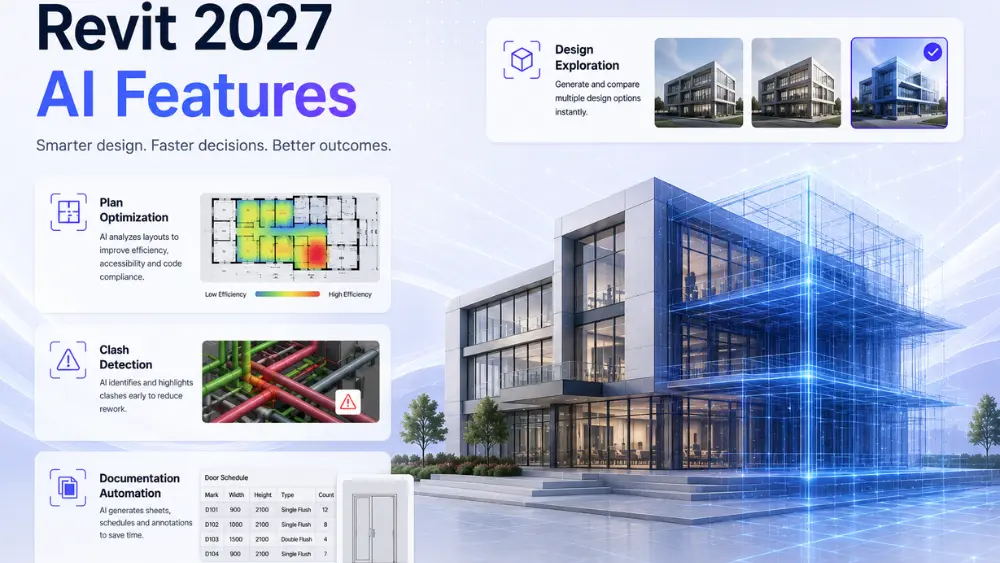
Revit 2027’s most significant AI features include generative design for spatial layouts, AI-powered clash detection with suggested fixes, automated sheet and annotation generation, smart family loading recommendations, reinforcement layout suggestions in structural models, and energy performance feedback during design — all embedded within the standard modeling environment without requiring external tools.
Generative Design in Revit 2027
How Space Planning Now Works
Generative design in Revit 2027 has matured into a usable tool rather than a demonstration feature. Given a defined boundary, program requirements, and orientation constraints, the AI generates multiple spatial arrangement options and ranks them against your defined goals — occupancy efficiency, daylight access, structural grid alignment.
Unlike earlier iterations, the 2027 version understands Revit families and places actual components into generated layouts. You’re not handed abstract geometry — you get a model-ready arrangement using your project’s loaded families, which you can accept, modify, or discard.
Constraints You Actually Control
You define what matters: adjacency rules, minimum room dimensions, circulation widths, structural bay spacing. The engine respects these hard constraints and optimises within them. This makes it genuinely useful for space planning in healthcare, education, and mixed-use projects where regulatory minimums are non-negotiable.
AI-Powered Clash Detection and Resolution
Beyond Finding Conflicts
Earlier versions of Revit, combined with Navisworks, could identify clashes. The 2027 version goes further — when a clash is found, the AI suggests a resolution path. For MEP-structural conflicts, it proposes rerouting options ranked by disruption cost to surrounding elements. For structural-architectural conflicts, it flags the model change with the least downstream impact.
This doesn’t eliminate engineer judgment, but it compresses the review cycle considerably. Instead of manually evaluating a dozen possible fixes, you review three ranked suggestions and choose one.
Real-Time Interference Warnings
A new passive interference layer runs continuously in the background. As you model, it tracks proximity violations between disciplines and surfaces a warning in the status bar — not an interruption, just a signal. This is particularly useful when working across linked models where changes in one file affect clearance requirements in another.
Automated Documentation and Sheet Generation
Sheet Sets From Model Logic
Documentation is where most teams lose time. Revit 2027 introduces AI-assisted sheet generation that reads the project’s phase structure, discipline assignments, and view filter configurations, then proposes a complete sheet set structure. It doesn’t place views — it creates a structured framework of sheets with titles, numbering, and standard title block population based on project information already in the model.
The automation pulls metadata already entered during the BIM setup phase and maps it to standard drawing title block parameters. For teams already following disciplined BIM naming conventions, this can reduce sheet setup from hours to minutes.
Annotation Intelligence
Tag placement has always been tedious. In 2027, the AI can place annotation tags across a view based on element category rules you define once, per project or per template. Room tags, door tags, structural column marks — it follows the rules and places them with leader avoidance logic so tags don’t overlap. You still review and adjust, but the starting point is clean.
Smart Family Loading and Parameter Suggestions
One of the quieter but genuinely useful AI in Revit improvements in 2027 is the family recommendation system. When you begin placing a specific category of element — say a structural beam or a plumbing fixture — the system analyzes the surrounding context and the project’s existing family library, then suggests the most compatible loaded families first.
It also flags parameter mismatches before you place an element. If a family’s shared parameters don’t align with the project’s schedule parameters, you get a warning with a suggested mapping — not a post-placement error discovered during quantity take-off.
Structural AI Features in Revit 2027
Reinforcement Layout Assistance
For anyone pursuing a Revit Structure course, this is one of the most relevant updates. The AI-assisted reinforcement tool in Revit 2027 can generate rebar layout proposals for standard concrete elements — beams, columns, slabs, walls — based on the structural analysis results and the project’s reinforcement specification.
It reads the assigned load conditions from the linked analytical model and proposes spacing, cover, and bar diameter combinations that meet the specified design standard. This is a starting point for the structural engineer to review, not an automated approval — but it dramatically reduces the time to produce a coordinated reinforcement layout in the 3D model.
Structural System Recognition
Revit 2027 can now recognize structural system patterns — moment frames, shear walls, braced frames, flat plate systems — and applies appropriate family defaults, analytical model connections, and naming conventions automatically when you’re building within a recognized system type. This reduces setup inconsistency across large structural models with multiple contributors.
AI-Assisted Energy and Performance Analysis
Revit’s built-in energy analysis tools have been significantly enhanced. In 2027, the AI layer provides passive feedback during early-stage design — showing energy performance implications of form, orientation, and glazing ratio decisions in real time within the model view, not after exporting to a separate tool.
This is most valuable during schematic design where small decisions have large downstream consequences. The feedback isn’t a full energy model — it’s a comparative indicator using the AI engine trained on Autodesk’s building performance dataset. It tells you that option A performs 12% worse than option B in heating load before you’ve committed the geometry.
Predictive Project Scheduling Integration
Revit 2027 AI Features deepens its connection to Autodesk Construction Cloud. The AI scheduling layer reads your model’s phase structure, element quantities, and assembly type classifications, then pushes a draft activity sequence to the connected project schedule. It doesn’t build a full CPM schedule — it creates the activity framework and estimates duration ranges based on comparable project data from Autodesk’s cloud intelligence.
This means the model and the schedule stay structurally aligned from the beginning, rather than the schedule being built separately and then never quite matching what’s in the BIM.
Model Quality and Compliance Checking
A built-in AI model auditing tool runs quality checks based on configurable rule sets — LOD requirements, naming standards, parameter completeness, view filter compliance, and discipline coordination standards. It produces a flagged report that each team member can work through, with direct navigation to each flagged element in the model.
This is meaningfully different from the older “review warnings” dialog, which was a flat list with no actionable guidance. The 2027 audit tool groups issues by priority, explains the standard being violated, and in many cases suggests the fix directly.
Revit 2027 AI Features — Comparison Table
Feature | Revit 2025 Capability | Revit 2027 AI Enhancement | Primary Beneficiary |
Clash Detection | Identifies conflicts via Navisworks link | Suggests ranked resolution options in-model | MEP, Structural |
Space Planning | Manual room placement | Generative layout proposals with families | Architecture |
Sheet Setup | Manual sheet creation | AI-generated sheet structure from model data | All disciplines |
Reinforcement | Manual rebar modeling | AI-suggested rebar layout from analysis data | Structural |
Energy Analysis | Export-based analysis only | Passive real-time performance feedback | Architecture |
Family Loading | Manual search in browser | Context-aware family recommendations | All disciplines |
What Revit Training Looks Like After This Update
These AI features change what proficiency looks like. Basic Revit training now needs to cover not just the mechanics of modeling but how to configure AI tools correctly — setting up constraint rules for generative design, defining clash resolution parameters, configuring audit rule sets for your firm’s BIM standards.
This isn’t harder — it’s different. Professionals who understand the logic behind BIM coordination will find the 2027 AI layer accelerates their work. Those who relied on procedural step-following without understanding the underlying BIM logic will find some of these tools harder to control than expected.
Good Revit Architecture Training programs have already adapted their curricula to cover the AI features in context — not as a separate module, but woven into how each workflow is taught. The same applies to structural training: a current Revit Structure course should include reinforcement layout assistance, structural system recognition, and analytical model coordination as standard content.
For professionals already using AutoCAD Revit software environments in a hybrid workflow, the 2027 AI features also improve the coordination between AutoCAD-sourced reference data and the Revit BIM environment — particularly in how the clash and annotation tools handle linked CAD geometry.
What AI in Revit Does Not Replace
It’s worth being precise about this. AI in Revit 2027 does not replace structural engineering judgment, architectural design intent, or MEP system engineering. It automates preparation work, surfaces information faster, and reduces the mechanical labor of documentation — but every significant decision still requires professional review.
The reinforcement suggestion is not a structural engineer’s certification. The generative layout is not a design. The clash resolution suggestion is not a coordinated drawing. These tools make competent professionals faster — they don’t substitute for competence.
Professionals using Autodesk Revit BIM software in project delivery contexts should treat AI outputs as reviewed drafts, not final answers. The liability structure of professional practice hasn’t changed — only the tools available to work within it.
Conclusion
Revit 2027 makes AI in Revit a practical, day-to-day reality rather than a featured capability buried in a menu. The changes across clash detection, generative design, structural reinforcement, documentation, and energy analysis are coherent and useful — they address real friction points in BIM workflows without requiring a new way of working. For professionals investing time in Revit Architecture Training or a Revit Structure course, understanding these features deeply is now a baseline skill, not an advanced topic. The platform has moved forward — the question is whether your working practice has moved with it.
Learn Revit 2027's AI Workflows at CAD Center
Reading about these features is one thing — actually configuring constraint-aware clash rules, running a generative layout, or reviewing an AI-suggested reinforcement plan is another. Our Revit Architecture, Revit Structure, and Revit MEP courses now build the 2027 AI workflows directly into the standard curriculum — not as a bolt-on extra module, but as part of how you learn duct routing, panel scheduling, reinforcement detailing, and clash review from day one.
That means you’re not learning workarounds built for older software limitations and then having to unlearn them later — you’re trained on how the tools actually work today.
What this looks like in practice:
- Setting up constraint-aware duct and pipe routing rules (not just running the auto-route and accepting defaults)
- Reviewing and adjusting AI-generated reinforcement layouts against real structural analysis results
- Using generative design options for space planning on an actual project brief, not a demo file
- Configuring AI-ranked clash detection and resolution inside Revit, alongside when you’d still reach for Navisworks
Whether you’re starting fresh in BIM or upgrading skills you already have, book a free demo to see how these workflows are taught before you enroll — classroom sessions run at our Ameerpet centre, with live online batches also available.
Frequently Asked Questions
Yes — the AI tools in Revit 2027 are built to accelerate existing modeling and documentation workflows, not replace the need to understand them. A solid grounding in core Revit modeling is the right starting point before working with generative design, AI clash resolution, or reinforcement suggestions.
No. The AI features generate suggestions — reinforcement layouts, clash resolutions, generative space plans — that still require professional review and sign-off. They speed up preparation work; they don’t replace engineering judgment or design intent.
Feature availability can vary by Autodesk subscription tier and region. Check your current Autodesk account or AEC Collection entitlement, or ask during a course demo, to confirm which AI features are included in your specific license.
Revit 2027 adds AI-ranked resolution suggestions directly inside the model, alongside a continuous background interference check — rather than relying solely on a separate Navisworks review pass. Many teams still use Navisworks for large-scale, multi-model coordination, but routine clash review can now happen without leaving Revit.
It’s built for real project use — the 2027 version places actual loaded families into generated layouts rather than abstract geometry, so outputs are model-ready and can be accepted, adjusted, or discarded like any other design option.
Not significantly. It’s a shift in what you’re taught, not additional length — configuring constraint rules, clash resolution parameters, and audit rule sets is folded into standard workflow training rather than taught as a separate advanced module.
No. It proposes a starting layout based on linked structural analysis results, which the structural engineer still reviews and finalizes — it reduces setup time, not engineering responsibility.
It can help with general drawing literacy, but it’s not required — Revit’s AI features work within Revit’s own modeling logic, and the 2027 update specifically improves coordination with AutoCAD-linked reference geometry for hybrid workflows.
Revit 2025 offered scattered smart features and export-based analysis. Revit 2027 embeds AI as a connected layer across modeling, clash detection, documentation, and energy analysis — see the comparison table above for a feature-by-feature breakdown.
Yes — since AI-assisted workflows are now standard rather than optional in the current release, learning them from the start means you won’t need to unlearn older manual workarounds later.