
If you’ve read anything about BIM coordination or ISO 19650, you’ve almost certainly run into the term “Common Data Environment” — usually shortened to CDE. It gets mentioned constantly, but rarely explained in a way that actually shows what it looks like in daily project work.
This guide explains what a CDE actually is, how it’s structured, why it exists, and what you need to know about it if you’re building a career in BIM.
What Is a Common Data Environment?
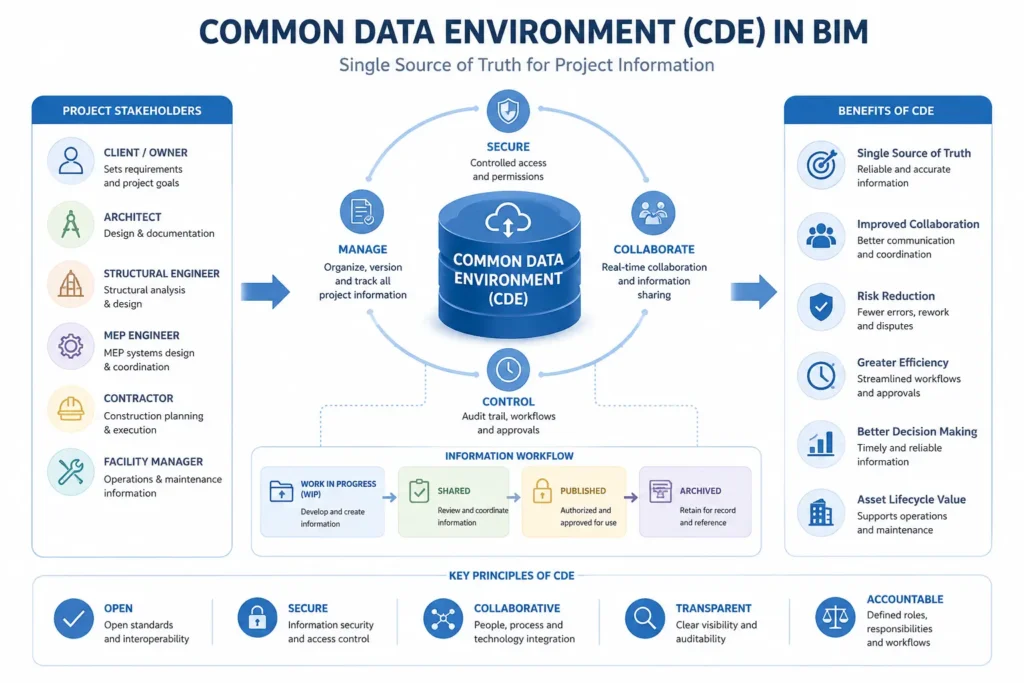
A Common Data Environment is the single, agreed-upon digital space where all project information — models, drawings, documents, and data — is collected, managed, and shared between everyone working on a project. Instead of architects, structural engineers, and MEP consultants each keeping their own separate files and emailing updates back and forth, everyone works from the same organized, controlled environment.
The core idea is simple: one source of truth. Without a CDE, teams end up with multiple versions of the same drawing floating around, no clear record of which one is current, and constant confusion about what’s actually approved for construction. A CDE exists to prevent exactly that.
Why CDEs Exist: The Problem They Solve
Before CDEs became standard practice, project teams commonly ran into the same recurring problems:
- Multiple people editing outdated versions of the same drawing without realizing it
- No clear record of who approved a design change, or when
- Files scattered across personal drives, email threads, and disconnected folders
- Contractors building from drawings that had already been superseded
A CDE solves this by giving every piece of project information a clear status, a clear owner, and a single authoritative location — so “which version is correct?” stops being a daily argument.
The Four-Stage CDE Workflow
Most CDEs, especially those following ISO 19650, organize information through four defined stages:
- Work in Progress (WIP)
This is where individual teams develop their models and drawings privately, before sharing with others. Nothing in WIP is considered reliable by other disciplines yet — it’s still being actively worked on and may change significantly.
- Shared
Once a team is confident their work is ready for others to review or coordinate against, it moves to Shared. This is where cross-discipline coordination actually happens — architects, structural engineers, and MEP teams review each other’s Shared models for clashes and inconsistencies.
- Published
Information that has been reviewed, approved, and authorized for a specific use — construction, costing, or client sign-off — moves to Published. This is the “official” version teams and contractors should be working from.
- Archive
Once information is superseded by a newer version or the project reaches a milestone, it moves to Archive. This preserves a complete history of the project without letting old versions confuse current work.
This structure means anyone on the project can look at where a piece of information sits — WIP, Shared, Published, or Archive — and immediately understand how reliable it is and whether it’s safe to build from.
What a CDE Actually Looks Like in Practice
In real project use, a CDE is usually a cloud-based platform — common examples include Autodesk Construction Cloud (formerly BIM 360), Trimble Connect, or similar collaboration platforms. Within it, project teams typically see:
- Folder structures organized by discipline, status (WIP/Shared/Published/Archive), and project stage
- Permission controls, so only authorized people can move information from Shared to Published
- Version history, showing exactly what changed and when
- Issue tracking, linking coordination problems directly to specific models or drawings
- Audit trails, recording who approved what and when — important for accountability on larger projects
Who Uses the CDE, and How
Different roles interact with the CDE differently:
BIM Authors upload their models into WIP as they work, then move completed sections into Shared once ready for coordination review.
BIM Coordinators spend significant time in the Shared area, running clash detection and reviewing consistency across disciplines before anything moves toward Published status.
BIM Managers oversee the CDE structure itself — setting up folder conventions, managing permissions, and ensuring the whole team follows the agreed information management process.
This is exactly the kind of practical CDE workflow covered in a good BIM Collaborate Pro course — not just theory, but hands-on practice moving real files through WIP, Shared, and Published stages the way a professional project team actually would.
Why CDEs Matter for Your BIM Career
Understanding CDE structure isn’t just theoretical knowledge — it directly affects how you work day to day in any BIM role. Knowing the difference between WIP and Shared status prevents embarrassing mistakes, like presenting unfinished work as final, or building from a superseded drawing. For BIM Coordinators and Managers specifically, CDE literacy is essential — much of the coordination role is managing the flow of information through these stages correctly.
Employers increasingly expect candidates to understand CDE principles even at entry level, since it reflects a broader understanding of how professional BIM projects are actually run — not just how to model in Revit. This is one of the reasons a structured BIM training program in Hyderabad that includes real CDE practice gives graduates a genuine edge over those who only learned modeling commands in isolation.
Frequently Asked Questions
A: No — while a CDE is often cloud-based, it’s specifically structured around defined information states (WIP, Shared, Published, Archive), permissions, and approval workflows, which generic cloud storage doesn’t provide.
A: Autodesk Construction Cloud (formerly BIM 360) and Trimble Connect are widely used platforms that provide CDE functionality, often paired with BIM Collaborate Pro for model coordination.
A: Larger, multi-discipline projects benefit most from a formal CDE structure, especially those following ISO 19650. Smaller projects may use simpler shared folder systems, though the same WIP-Shared-Published logic still applies informally.
A: This is typically defined in the project’s BIM Execution Plan, with approval authority usually resting with a BIM Manager or a designated technical lead for each discipline.
A: Understanding the underlying concept (WIP-Shared-Published-Archive) matters most, since it applies across platforms — but hands-on familiarity with a platform like Autodesk Construction Cloud gives you practical, job-ready experience.
A: CDE principles are commonly covered in BIM and ISO 19650-related training and certification programs, since information management is a core part of professional BIM practice.
A: CAD Center Hyderabad’s BIM training in Ameerpet includes practical experience with Common Data Environment workflows as part of our BIM Execution Plan course and BIM Collaborate Pro course, using real project-style data.
A: Course fees vary depending on batch and mode (online/offline). Contact us for exact pricing for your preferred schedule.
Ready to Learn CDE and BIM Coordination Hands-On?
Understanding CDE structure is one thing — working with one on a real project is another. Our BIM training gives you hands-on practice with the exact WIP-Shared-Published workflows used on professional projects.
Prefer to learn from home? Live online batches are also available for students outside Hyderabad.